J
EP. 006
AI for Solo Founders
WEDNESDAY, AUGUST 26, 2026
29.8 million Americans are running a business of one.
Between them they do $1.7 trillion a year. That is 6.8% of everything the US economy produces, made by people with nobody on payroll.
I read that this week and have not stopped thinking about it.
The rest of this issue is really just evidence for it. Three ChatGPT features, a presentation kit I am giving away, a prompt that turns somebody else's reel into your B-roll, and a small app that catches every lead magnet you have ever downloaded.
All of it built by one person for teams of one.
Start with the number.
THE SOLO ECONOMY
29.8M
IN THE US
Businesses of one
$1.7T
6.8% OF OUTPUT
Revenue they generate
46%
40% MORE BURNOUT
Say they feel isolated
Hot Take
Solo is not the small version of a business.
Every business voice tells you the same thing. You have made it when you have a team. Hire, delegate, build the org chart.
Meanwhile 29.8 million Americans are quietly running a company of one and producing 6.8% of the US economy. 64% of them already use AI for their marketing.
Here is the part that should stop you. 46% say they feel isolated, and they report more burnout than owners who do have staff.
Read those next to each other. The model works. The money is real. What is missing is not headcount.
Leverage and isolation are two different problems, and almost everyone tries to fix both by hiring. That is the expensive way to solve one and the slow way to solve the other.
You do not need a team. You need leverage so the work gets done, and people who get it so you do not lose your mind doing it.
THIS WEEK IN AI
1
Why it matters: Rolled out August 20 to the Mac app on every plan. It reads and searches your Messages history, iMessage, SMS and RCS, and drafts replies without you opening the app. Sending needs your approval every time. If any part of your business runs through Messages, finding where you quoted a client a price stops being a twenty minute scroll.
9TO5MAC · 2 MIN READ
2
Why it matters: The public S-1 could land by the end of this month, with a Nasdaq listing targeted for October. Reporting says it will name public backlash against AI as a risk factor, which would be a first. Last issue I told you Anthropic had turned a profit. This is the follow up, and once that document is out, anyone building on Claude gets the real numbers instead of leaks.
CNBC · 2 MIN READ
THE BREAKDOWN
Three features, one direction
None of them make the answers better. They make it able to do things where you actually work.
Computer history. Settings, computer history, turn it on. Now it keeps an eye on what you are working on, and you pick exactly which apps and websites it can see. What that buys you is the end of re-explaining yourself. Ask what you were working on this morning and it knows.
Sites. Type @sites and anything you are working on becomes a live website. Hosting, logins, databases, all of it. The part nobody is using yet: publish the thing, then annotate what you want changed directly on the page. Describing a layout problem in a paragraph never comes back right and you know it.
Voice mode. Start a voice chat and it follows you into whatever app you are in. And it is not just talking back. It opens new chats, spins up agents, and goes and does the thing while you keep working. I am dictating half my day now and barely touching the ChatGPT window.
Here is the thing though. What these collapse is the gap between having a thought and getting it done, and that gap is where most of your ideas quietly die.
COMPUTER HISTORY
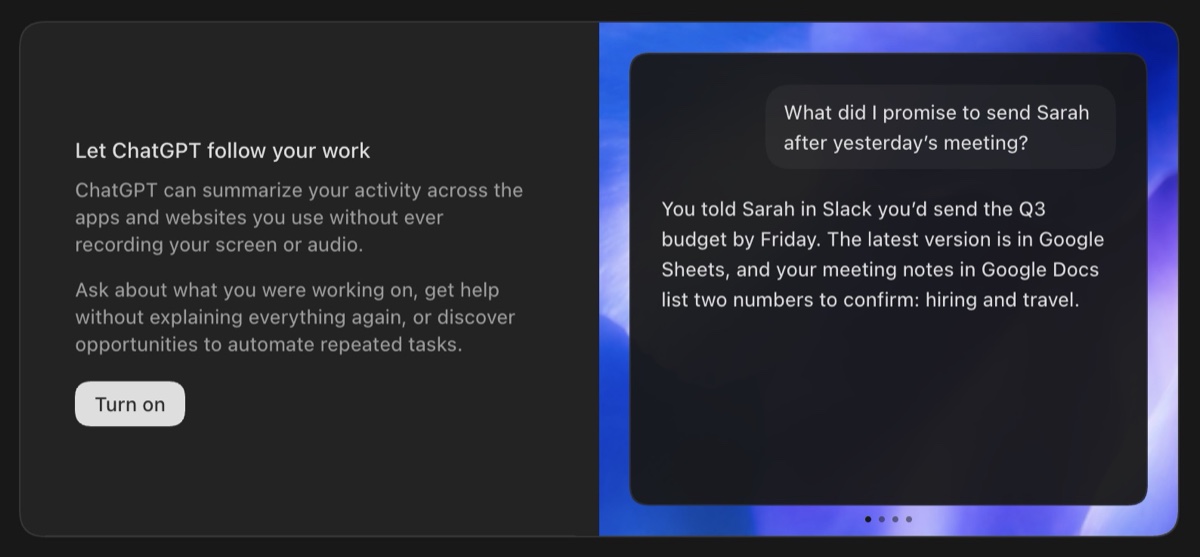
It summarises your activity across the apps and sites you use, without ever recording your screen or audio.
SITES
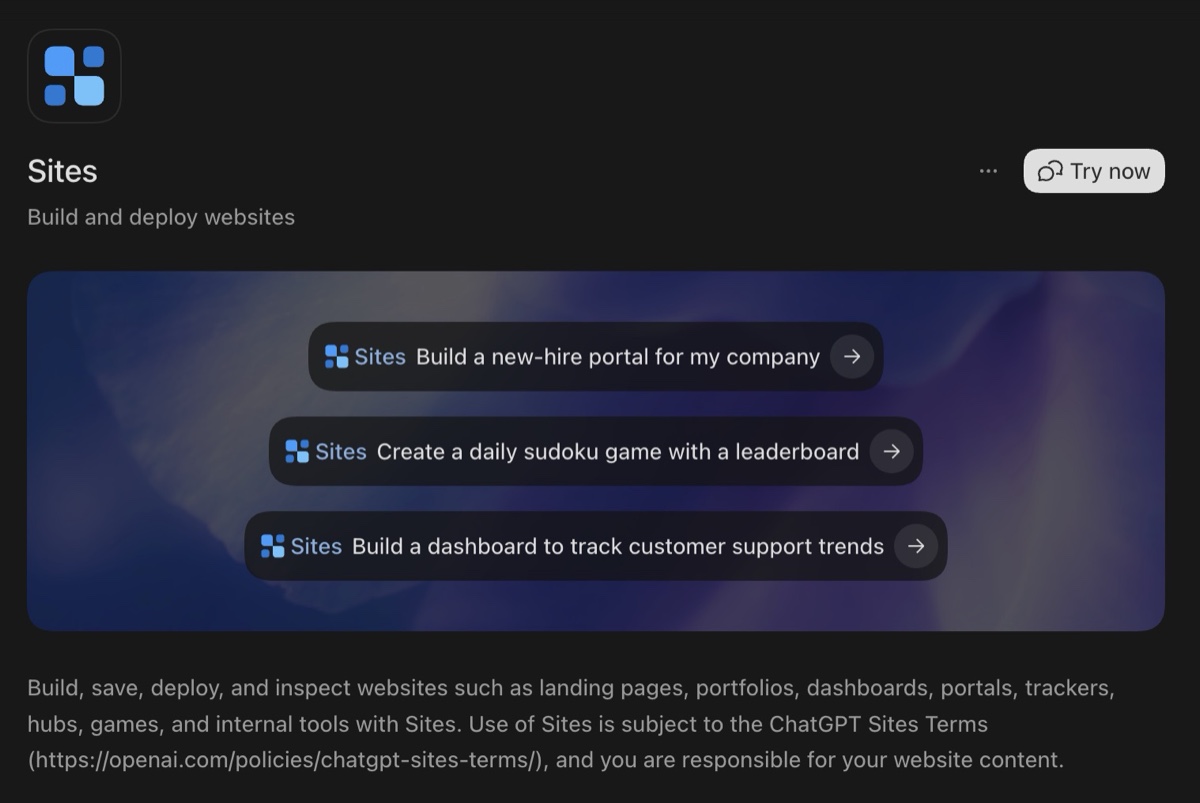
Build and deploy a website straight out of the chat. Hosting, logins and databases included.
PROMPT OF THE WEEK
Have ChatGPT watch a reel and hand you the B-roll
ChatGPT can watch video now. Not just pull the transcript, actually watch it, frame by frame.
So I gave it a reel that was crushing and asked why. It went beat by beat, told me what was doing the work, then pulled the strongest moments and turned them into images I could use, with the prompt for each one underneath. Those went into Higgsfield and came back as B-roll.
Copy the link of a video that is performing and run this on it.
Do not steal the content. Take the structure. Shout out to RPN for the inspiration.
Watch this video and break it down for me: [PASTE LINK]
Do not summarize it. Watch it properly, beat by beat, and tell me why it performed.
1. THE BREAKDOWN
See the full promptShow less
Watch this video and break it down for me: [PASTE LINK]
Do not summarize it. Watch it properly, beat by beat, and tell me why it performed.
1. THE BREAKDOWN
Go through it in order and mark every point where something changes: the hook, each cut, each visual switch, each shift in pacing. For every beat give me the timestamp, what happens, and what job that beat is doing.
2. WHY IT WORKED
The honest read. What the hook is actually doing in the first two seconds, where it earns the next five, what holds someone to the end. Be specific and skip the generic advice.
3. THE ASSETS
Pick the strongest visual moments. Turn each one into an image I can use, generated as its own file I can download, with the exact prompt you used underneath so I can change it later.
4. THE STRUCTURE
Strip the topic out and give me the reusable skeleton, beat by beat, so I can run it on my own subject.
Rules:
- Be blunt about what is not working, not just what is.
- Tell me what is happening on screen, not engagement-bait advice.
- Do not rewrite the script. I want the structure, not the copy.
COPY · PASTE · REPLACE THE BRACKETS
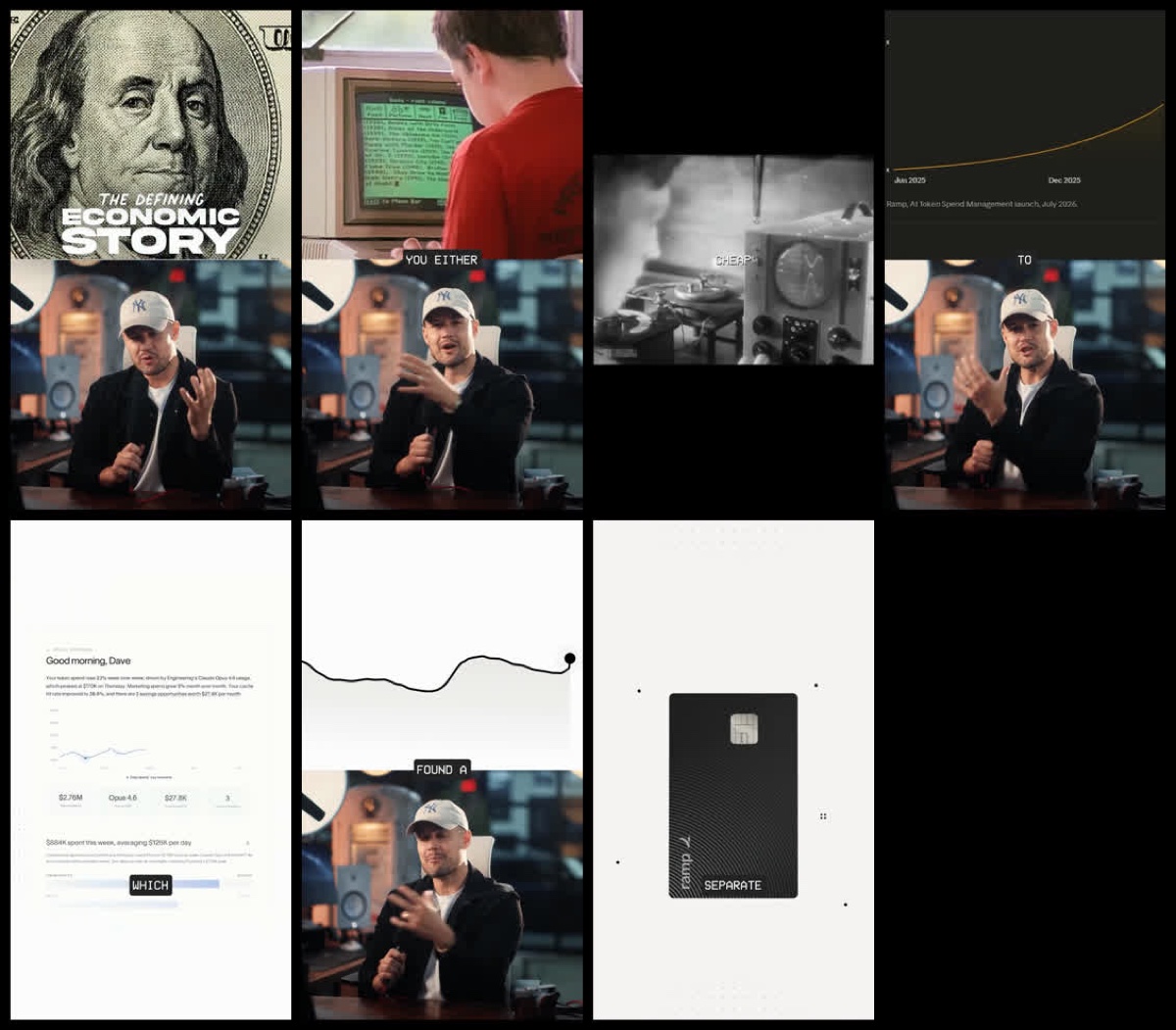
The moments it pulled out of the reel, each one generated as its own file with the prompt underneath.
TOOL OF THE WEEK
Presentation Kit
Free, open source
I would end up in PowerPoint or Slides fighting a template, and the thing would still come out looking like a deck. So I stopped making slides.
This is a folder you hand to ChatGPT or Claude with your brand guide. You tell it what you are teaching, it proposes an outline, you fix the outline, and it builds you a scrolling website in your own brand. Twenty section types: covers, animated counters, before and after toggles, screenshot galleries, checklists people tick on screen, and a live frame you can embed a real working tool inside.
Two things slides cannot do. Press E mid-presentation and click any text to change it, so you fix a typo live on the call. And every image slot takes a drag and drop.
No build step, no account. Download the ZIP, open the file, present. I built the whole thing in Claude.
Verdict: if you teach anything live, this is just how it should be done now. Slides were a printing constraint and we stopped printing.
Try it →
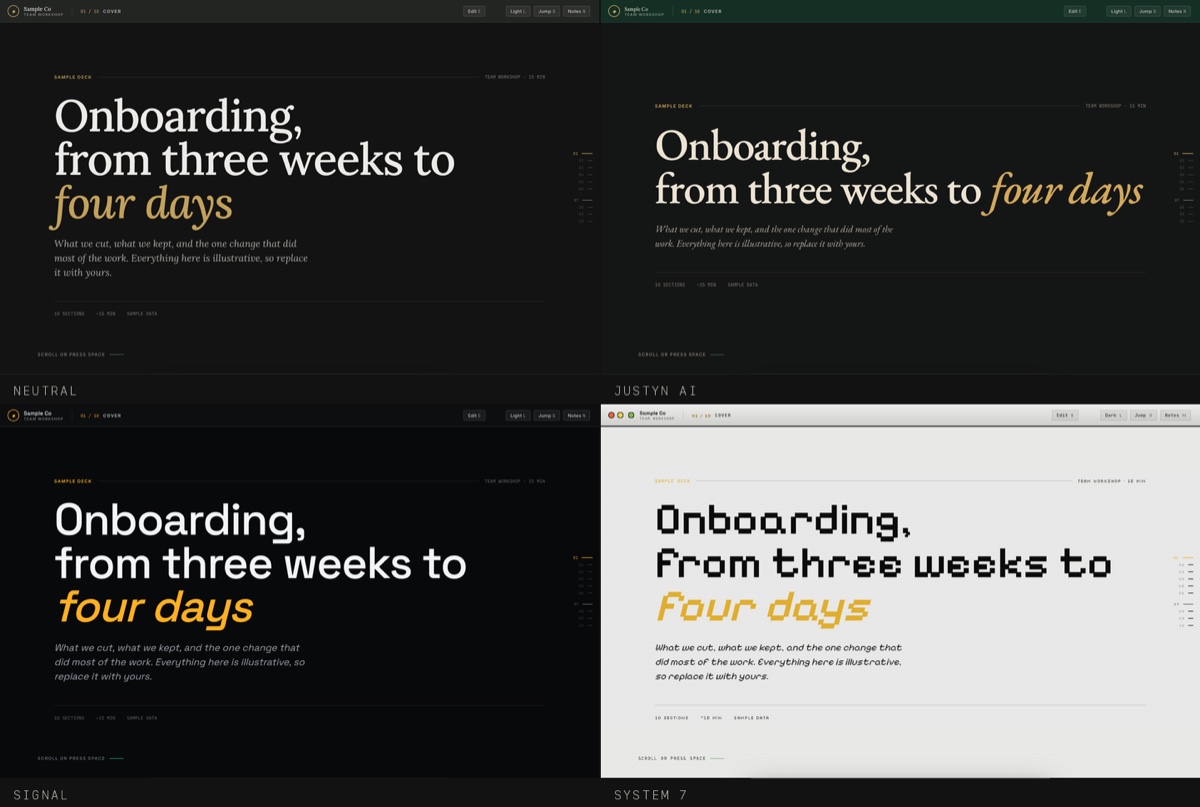
The same deck in four themes. One token file is the only difference between them.
BUILD THIS YOURSELF
The app that catches every lead magnet you download
You have downloaded a hundred free guides, checklists and templates. Be honest about how many you have opened twice. They are scattered across your downloads folder, your inbox and your saved posts, which means you paid with your email address and got nothing back.
So I built a dashboard that holds all of it, searchable by creator, type, keyword or tag. It runs on your machine, no account, and nothing leaves your computer.
Paste this into Codex or Claude Code and let it work. The finished code and the full video walkthrough are in the Dojo if you would rather skip the build.
Build me a local-first Resource Library web app.
WHAT IT IS
A private dashboard where I save the useful resources I collect from social media, email and the web: PDFs, checklists, spreadsheets, templates, swipe files, guides, links and websites. It runs on my computer. No account, no database, no API keys. Everything lives in browser local storage.
See the full promptShow less
Build me a local-first Resource Library web app.
WHAT IT IS
A private dashboard where I save the useful resources I collect from social media, email and the web: PDFs, checklists, spreadsheets, templates, swipe files, guides, links and websites. It runs on my computer. No account, no database, no API keys. Everything lives in browser local storage.
WHAT IT NEEDS TO DO
- Add a resource with title, link, creator, resource type, tags, and an optional note.
- Search across title, creator, keyword, type and tag.
- Filter by creator and by resource type.
- Suggest creators and tags I have already used while I type, and let me add new ones without leaving the form.
- Edit or delete any saved resource, with a confirmation step before anything is deleted.
- A dashboard view showing my most-saved creators, my most-saved resource types, and recent activity.
- Dark and light mode.
- Work properly on desktop, tablet and phone.
HOW IT SHOULD LOOK
Clean and intentional. Real spacing, one accent colour, no gradients, no glass effects, no glowing anything. Every element earns its place. If it looks like an AI made it, do it again.
BEFORE YOU BUILD
Ask me anything you need to know first. Then propose the structure and wait for me to approve it.
WHEN YOU BUILD
- Set up the project, install what it needs, and write tests.
- Run the build and the tests, and fix whatever fails.
- Start the local dev server and give me the URL.
- Leave the library empty. Do not add sample data.
ONE THING I WANT BUILT IN
Local storage lives on this browser on this device and does not sync. Clearing site data wipes it. Put that warning somewhere I will actually see it, and give me a way to export my whole library to a file.
COPY · PASTE · REPLACE THE BRACKETS
道
Everything I build, before it goes anywhere else
The finished Resource Library code and the full setup walkthrough are in there now, along with the video on the reel breakdown.
Weekly live calls, the systems I am actually running, and a room full of solo founders shipping instead of researching. Which, going by that 46%, is most of the reason it exists.
First 7 days are free.
Join the Dojo
FIRST 7 DAYS FREE
One last thing.
Every single thing in this issue got built by talking, not typing. The reel breakdown, the presentation kit, the resource library, all of it started as me saying out loud what I wanted.
You do not need to learn how to build. You need to get specific about what you want.
Keep pushing forward,
Justyn
Justyn
 by Justyn. Shipped with
  by AI.